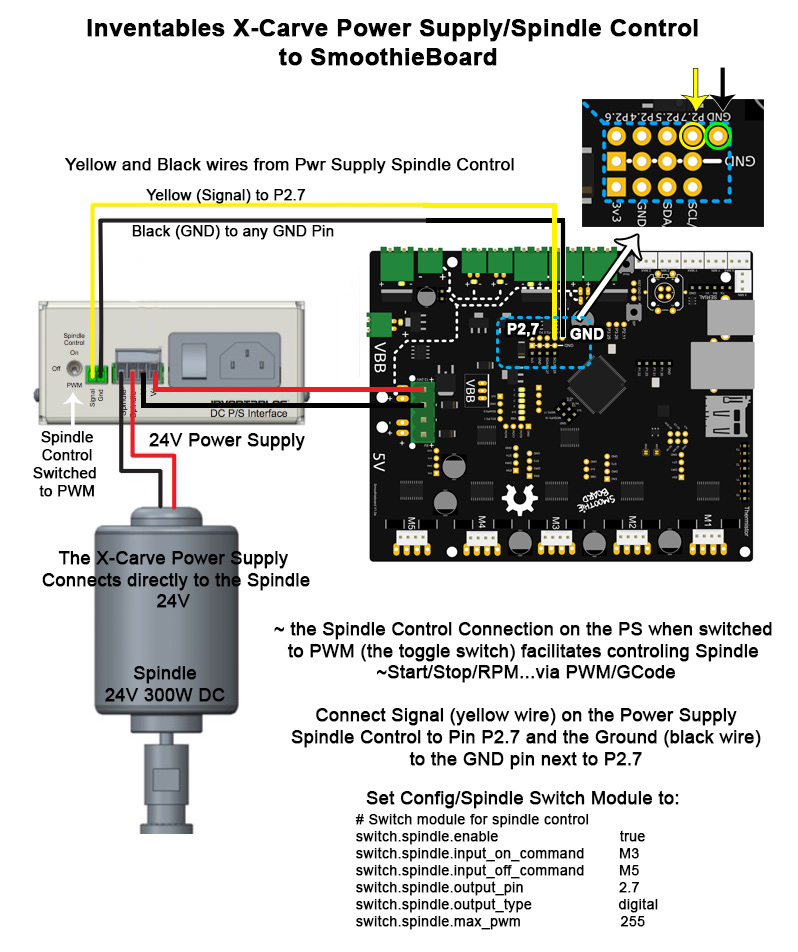
@Arthur_Wolf ~ wanted you to have a look at what I hope is the final wiring schematic for the X-Carve Spindle Control to SmoothieBoard ~ as per our discussion yesterday ~ the test (connect to 3.3v and gnd) seemed to work fine ~ spindle turned on when connection was made.
;{) Thanks @Wolfmanjm for that bit of direction.
So I will seek your nod on this and then if correct proceed with the connection ~
Boy the SmoothieBoard is a danged hardy board ~ no blue flames or smoke yet ~ and well ~ it’s not like we haven’t tried to set it afire!!! >Grinn<
Yeah that looks about right
@Arthur_Wolf Ha! I love when you say that! Well nothing melted ~this time! ;{P
@Arthur_Wolf So I guess you might be wondering what happened ~ connected as shown above ~ with output_type to digital ~ PS Spindle control switch to Logic(auto) ~ powered everything up and the Spindle was off on startup ~ as it’s supposed to be~ yeehoo! and in Pronterface I got starts and stops ~ M3 and M5 ~ but no speed changes ~ like sending M3 S50 ~ or M3 S128 ~ or M3 S250 ~ always the same pitch of the spindle ~ I supposed that’s how I would gauge if there is a speed change ~ hmmm…
So I changed the switch.spindle.output_type back to pwn ~ and speed changes are happening ~ Yee Hoo again!
Thanks for you help on this and to @Wolfmanjm too ~most appreciated!
hmm… while I have you…
I understand how the S numbers are related to the 0-255 pwn range ~ S128 would be about half speed ~ and am I to expect that S255 would be running the spindle about it’s max rpm rating ~ in my case 12000 rpm ~ is that correct?
ok so you probably want the output_type set to hwpwm
@Arthur_Wolf Ok… I’ll try that ~ to be clear I am saying that it is working ~ speed ~ values between 0-255 ~ can you explain a bit why you are suggesting hwpwm ~ I will go ahead and change it just because I am curious however…
;{)
Got the Limit Switches all working ~ X-Carve uses 3 ~ well that’s what they send you ~ so they are testing well M119 etc… I will need to read further to figure out the homing thing… but I seem to be getting the hang of this. Merci!
@Chapeux_Pyrate hwpwm uses hardware pwm so it’ll work better ( or the same ) and use less ressources on the microcontroller
@Arthur_Wolf Good to know thanks!
@Chapeux_Pyrate once it works all fine, you owe me a video of the machine cutting, with g-code control of the spindle at the beginning and end, for my youtube channel 
@Arthur_Wolf will do! I will be very happy to document on video and also make up some clean wiring diagrams etc… specific to the X-Carve ~ I am exploring a few different ways to control the SB/XCarve right now ~ pronterface from RPI2 and from my Mac as well ~ learning the ropes ~very basic ~ manual control works well (sending codes and jogging). I will most likely use the RPI2 connected to my Mac through ethernet ~ figured out how to set the RPI2 to show up (bonjour) on the Finder window ~ one button click to open in Remote Desktop ~ how’s them “Apples” ~ so then I can control from my Mac but all is done on the RPI2 ~ streaming to the SmoothieBoard via Ethernet from the Pi. Not bad for a Pirate Artisan type eh!?
@Arthur_Wolf Of course once I get some results I will be glad to boast of the SmoothieBoard/X-Carve on Inventables forum ~ I know of a few who are looking at the SmoothieBoard as their controller for the X-Carve ~ I am planning to post a step by step on the forum.
Cool, forum posts are good
@Arthur_Wolf Sell more SmoothieBoards and get a lively X-Carve community going around the board ~ so I won’t have to think so much as I have been doing! HAR!
@Arthur_Wolf Oh, I am also looking at alternatives to pronterface on the Pi ~ maybe GRBLWeb ~ recently came out with a Raspberry Pi2 version ~ I am checking out how to install it on my Pi2 right now… just to see if it will work with the SB ~GRBLWeb offers CNC specific gui ~ that would be nice to have ~ so not to feel like a second class citizen as with Pronterface. Have you ever tried GRBLWeb?
@Arthur_Wolf Just asked to join the X-Carve G+ community ~ you may want to have look there ~I know of one other person who is using the Smoothieboard on the X-Carve (well the Shapeoko2) @Adam_Harris ~ you may know him already.