Color Palettes I have started using colour palettes and I have a few questions.

Color Palettes

I have started using colour palettes and I have a few questions.
I have read up about them here (https://github.com/FastLED/FastLED/wiki/Gradient-color-palettes) and here (http://fastled.io/docs/3.1/group___colorpalletes.html) but I have not really got my head around it all. I did try to do a search on the Google groups and that was not useful because too much came up and I could not find the right information. so my questions are:

How do they work? As in what is happening in layman terms. My understanding is that there is a ‘layer’ which is what the palette looks like, so to use the lava preset as an a example, one side is black, whilst the other side through a coloured gradient is white. We can then use code to make it move along, or do what we like, but in essence the ‘layer’ is what we are going to be showing. Is this correct?

Moving to the code, I have a few questions. I adapted the colour palette which was pre installed and came up with this (https://gist.github.com/Tejkaran/cd6c7b1c065d193d77788a9115956249). It is a a rotating switch-case scenario of all the preset versions. Whilst I can get it to work, I don’t truly understand what is going on in the code. what is required, and also what ‘what’ does.
IE
CRGBPalette16 currentPalette; - I know it is needed, but what does it do?

TBlendType currentBlending; - same again, what is the purpose of this? As in why do we have to call TBlendType? whenlater on we call the blending to be LINEARBLEND

extern CRGBPalette16 myRedWhiteBluePalette; - I have no idea what this does

extern const TProgmemPalette16 myRedWhiteBluePalette_p PROGMEM; - nor any idea what this does too

startIndex = startIndex + 1;
what does this do? i know it links to the function somehow, but I cant get my head around it - would be really useful to understand this

Is there a way to write this code getting rid of all the paraphernalia. just having the bare bones basicas, or is it that all of this is needed?

what is the syntax for ColorFromPalette? I see it written in a few ways and have become confused as to how it is written?

Finally, to make ym custome palette, what is the simplest way to do that too?

I appreciate there is a lot asked here, but I am keen to understand about colour pallets as I feel they are very useful and if i know more I could use them better.

thank you in advance!

Hi! Glad you’re starting the lean about palettes and how FastLED uses them!
FastLED palettes are pretty much like all other computer graphics palettes with just one notable difference: most CG palettes have 256 color entries, and FastLED does support that. But FastLED ALSO has a memory-saving 16-entry palette type that can act like a 256-entry palette. (It just spreads out the 16 entries, and interpolates between them.)

So to learn more, read up on computer graphic color palettes in general. They’re truly nothing more than an array of colors which you can retrieve with an index value.

Once you’ve got the concept down, it’ll be easier to see how FastLED is using them.

Also, and I actually love this part, remember that FastLED is 100% open source! You have the full, commented source code for the palette functions to look through and learn from, too!

I’d recommend doing a few more hours of playing around, and reading the docs, and other code and examples. I suspect it’ll start to fall into place, since you already seem off to a good start understanding it. Feel free to ask more questions after a few more hours of experimentation!

(Anyone else want to chime in with hints here?)

I think it’s easier to understand palettes if you understand blending first. For example, let’s say you want to make a LED go from Blue to White. You would use a number from 0-255 to represent the transition. 0 is full Blue, 255 is full white. 127 would be a color in between, kind of a lighter blue (the blend() function does that). So maybe you would have a timer that increments the value every 20 milliseconds, and you would obtain a smooth transition.

blend(CRGB::Blue,CRGB::White,value);

Now imagine that you could add another color in the middle. 0 would be Blue, 127 would be Red and 255 would be white. You could do it with two blend()s but it would require some hoops and scaling and would complicate your code. What about if you wanted 2 more colors at position 100 and 200? Even more complicated.

This is where Palettes come in. You could define a palette like this :

CRGBPalette16 MyPal = CRGBPalette16(CRGB::Blue,CRGB::Red,CRGB::White);

And use it like this :

ColorFromPalette(MyPal, value);

Your value, going from 0 to 255, would return you Blue at 0, Red at 127 and White at 255, while smoothly blending the colors in between.

Regarding your question: “startIndex = startIndex + 1; what does this do?”

Are you asking what that line does? If so, I highly recommend you spend some time learning more basic Arduino (or general programming) concepts. I’m not trying to be rude or anything, just trying to get an idea of your experience and knowledge level.

thanks guys. I have made a small and easy one using the fillPalette function (https://gist.github.com/Tejkaran/dcc4db20f00d8bcb3cef830f9f3c72e8). Tip toeing forwards

@Mark_Kriegsman
I have been playing around today, and I have got the fillPalette working. so i understand what is going on.
in addition, I have done some reading so I am getting to grips with it quite quick. It is looking promising. Getting my head around the function used (void FillLEDsFromPaletteColors(uint8_t colorIndex)) , as I haven’t used pointers before so understanding what the colorIndex is calling to/doing there. But im working on it

@Franck_Marcotte
I really appreciate how you have shown the work from the bottom up, and it is very clear to me now. Going to play around in a bit so good points to follow there

@Jason_Coon
I understand what it is doing IE adding +1, more along the lines of what role does the startIndex play. I feel I have that figured now. It is the point at which the palette starts :slight_smile:

There are many different ways to define a FastLED palette. I prefer a way that allows maximum control about the color distribution:

DEFINE_GRADIENT_PALETTE( stefans_palette) {
// index R G B
0, 255, 0, 0,
127, 255, 130, 0,
255, 255, 0, 0
};

Details are explained here: https://github.com/FastLED/FastLED/wiki/Gradient-color-palettes

Also interesting: You can do something like

leds[i] = ColorFromPalette( currentPalette, colorIndex, brightness);

in order to use a palette AND play with the brightness of the color at the same time.

@Stefan_Petrick
Stefan, I realise you can do that, and it is my next step after I finish the bit I am doing now. Could you mock up a very very simple custom one so I can see how it works? And i can go from there? Or direct me to one where there is a custom already?

Tejkaran, I just started playing around with palettes for the first time a few days ago. I created a sketch where an led dot passes back and forth along my led strip changing colour randomly according to the palette I’m using. It also runs the blur1d command which creates interesting flickering interaction where the colours change. Script is called “Palette Chase”, here:

You will probably have to modify the data pin, number of leds etc.

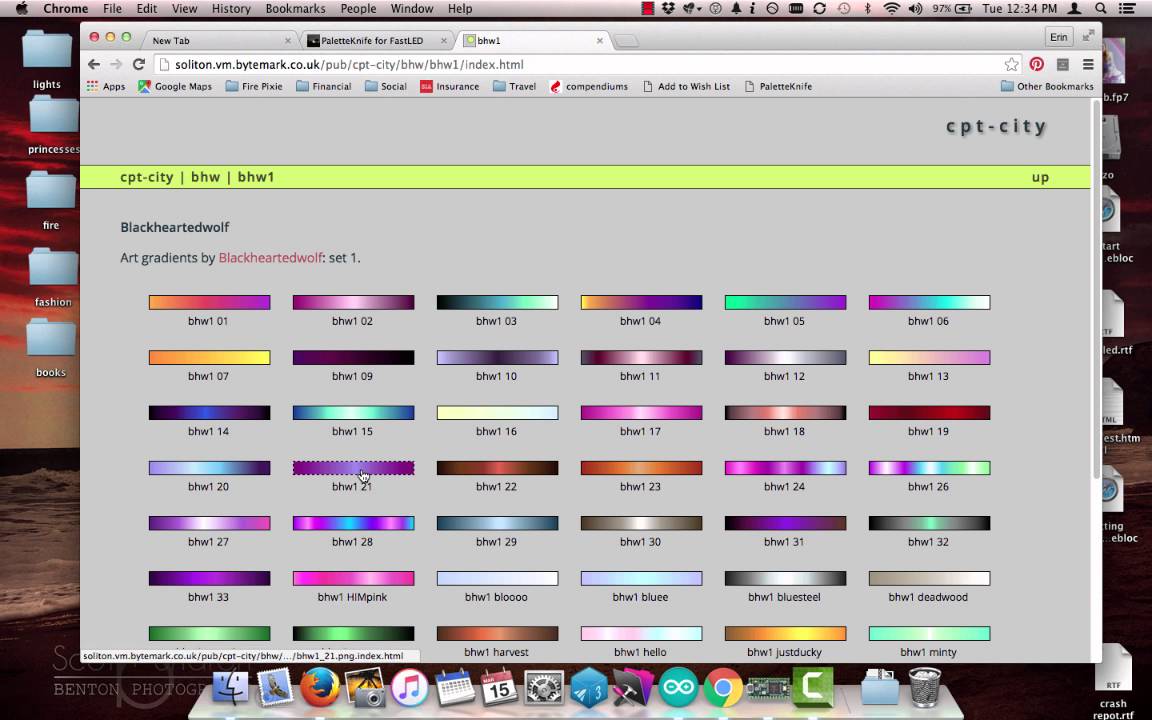
You can access thousands of palettes for free here:

But there’s a really cool and easy method for doing it. Watch this youtube video:

It shows you how to get hold of a browser shortcut that will capture the code for any of the palettes on that palette website, so you can easily paste them straight into an Arduino sketch in a few seconds.
In my ‘Palette Chase’ sketch you will see the palette code added in one section. Once you have pasted it in you have to add the name of the palette (e.g. “bhw1_04_gp”) in the CRGBPallette command just below it, and the job is done!

DEFINE_GRADIENT_PALETTE( bhw1_04_gp ) {
0, 229,227, 1,
15, 227,101, 3,
142, 40, 1, 80,
198, 17, 1, 79,
255, 0, 0, 45};

CRGBPalette16 myPal = bhw1_04_gp;

Hope this helps :slight_smile:

hi @dimwoo
thank you very much for the help.
I just reread all the things I asked and with your help regarding custom palettes, I finally understand it all.

Next step is the palette knife which will be interesting!

the bit I did not understand about the custom palettes was where to write it to integrate it into the code properly. I mean not to disrepect the person who who wrote the guide on it, but it is a little to vague for a novice.
Got it all now :slight_smile: it is a happy day today

I guess it depends on your code. But in my script it is just defined after the void setup, like any variable. Probably could define it at the beginning with the other variables - try it!
It just creates the “bhw1_04_gp” variable (or whatever the name of your palette) which you can then call within the void loop.

Palette Knife is really easy to use. Create it as a bookmark as shown in the youtube video then select a palette from the palette website and hit the Palette Knife bookmark:

missing/deleted image from Google+

This windows then pops up and you copy the highlighted text within and paste it into your script:

missing/deleted image from Google+

That code is the palette definition, just like in my example script:

// Gradient palette “YlOrRd_06_gp”, originally from
// http://soliton.vm.bytemark.co.uk/pub/cpt-city/cb/seq/tn/YlOrRd_06.png.index.html
// converted for FastLED with gammas (2.6, 2.2, 2.5)
// Size: 48 bytes of program space.

DEFINE_GRADIENT_PALETTE( YlOrRd_06_gp ) {
0, 255,255,103,
42, 255,255,103,
42, 252,178, 37,
84, 252,178, 37,
84, 252,115, 12,
127, 252,115, 12,
127, 249, 69, 6,
170, 249, 69, 6,
170, 217, 10, 1,
212, 217, 10, 1,
212, 117, 0, 2,
255, 117, 0, 2};

You can delete the description stuff at the top, all the // lines.

You only need this bit, where the palette is defined:

DEFINE_GRADIENT_PALETTE( YlOrRd_06_gp ) {
0, 255,255,103,
42, 255,255,103,
42, 252,178, 37,
84, 252,178, 37,
84, 252,115, 12,
127, 252,115, 12,
127, 249, 69, 6,
170, 249, 69, 6,
170, 217, 10, 1,
212, 217, 10, 1,
212, 117, 0, 2,
255, 117, 0, 2};