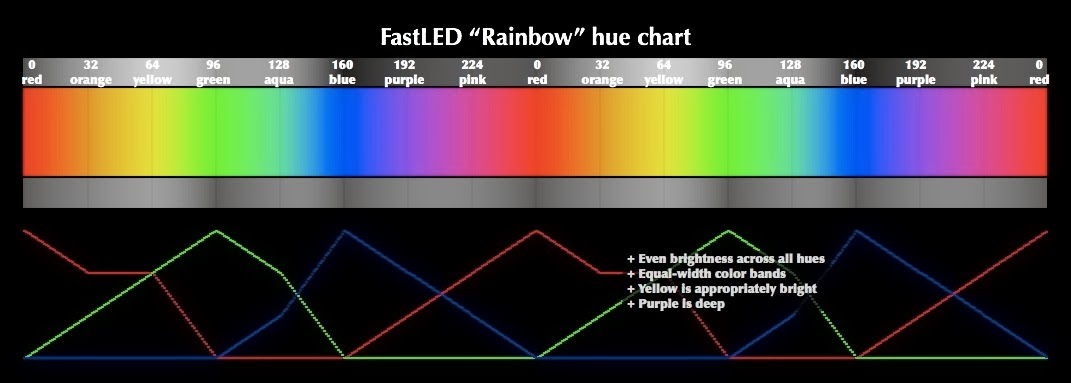
It’s also worth mentioning that there is absolutely no way to have a color chart on an LCD display to “look like” the light you get by mixing light from three independent RGB LEDS, so use this chart as a starting reference, but you’re going to have to see “how it looks” on your LEDs yourself. It’s not even a matter of color-matching, white point, and gamma curves – although those things all DO matter! Also: oops, I uploaded a slightly ‘wrong’ graphic to G+, it’s close, but the image on the wiki page is better.
You’re welcome; I’d been hoping to do it for some time, especially since HSV color spaces and hsv-to-rgb color conversions have been a couple of the big things I’ve been working on for a year now!
It’s something that I use in every design I make. It’s really delightful. Being able to go back and forth between RGB and HSV so seamlessly is one of the things that brings real delight to me while using FastLed. Between the names colors and the simplicity of “leds[i] = CHSV(h,s,v)” I’m smiling every time I use FastLed.
For compile-time constants, sure, you could multiply by your “classic” hue angles in degrees by 256/360 (aka 0.71111) and your “classic” sat and val percentages by 256/100 (aka 2.56) for a starting point.
But even then, the traditional “hue” color map is spectral rather than rainbow, so the hue numbers aren’t going to line up. And I bet that your output LEDs aren’t color-calibrated (…yet… hinthint), so the actual output hue will be even further off from whatever source you’re starting from.
(Actually: What source are you starting from that gives you 360-scale hues? Just curious if there’s some source that everyone but me is using…)
I really wrestled with the question of whether to use a 360-scale, or a 96-scale (ala old adafruit code etc), or a 256-scale, or what. And given that there were already a few different scales, and that using the 256-scale resulted in code that was ten times faster and half the size, that seemed like the right choice for microcontroller-based animations where every byte and every cycle counts.
Thanks again, Zeke.
Oh hey- question about the named colors: we pulled the color definitions from an HTML standard somewhere, but now that I see some of them on LEDs, they don’t look “right” to me, because, I suspect, the hex values are intended to be used on a gamma-corrected output device, and raw LEDs aren’t gamma corrected.
Subjectively, how have you found the color names to be? Do they render about right, or do you have to mess with them?
I’m generally using them for really basic colors (red, magenta, blue, black, etc). Those look correct. I seem to recall that the oranges and browns seemed off to me, but it’s been a while since I’ve used them.
I use Kuler for the creation of color pallets. A macro that would convert from 360* to 255 would be fabulous. I’ve thought about making one for the .71 calc, but ran into the spectral issue so I generally just do the calc using my “Calculator” and hardcode them.
I really like the 255-scale. It’s generally what I want (except when looking up complementary colors and that stuff).
Thanks, that’s my general impression as well: the ‘basic’ colors are about right, and the others are … less right. The Right Thing To Do is have a nice easy (and wickedly fast) gamma correction function available somewhere. Hrm.
The chart is really helpful. Seems like a good middle ground between gamma correction and maximum brightness at any hue. This seems to make sense on AVR or slow microcontroller where performance is key. https://github.com/FastLED/FastLED/blob/master/hsv2rgb.cpp
If I understand, you’re trying to create a very dim rainbow? If so, you’ll have better results using a higher Value in the HSV, and then just turning the master brightness (FastLED.setBrightness) down to a lower value. This is true now in the 2.0 version of FastLED, and will be ever more true in the forthcoming v2.1. Am I understanding correctly, that you’re trying to paint a ‘dim’ rainbow?
So you have two choices: either put a min brightness as you say, or adjusting the master brightness.
Adjusting the master brightness is extremely fast, much faster than re-drawing the whole rainbow. You can adjust it every time if you wish, with no problem at all. I have written lots of code that does just this. I often like to have the master brightness pulse in time to a beat.
Also, starting in the v2.1 version of the library, you’ll get much better quality results if you draw the rainbow at ‘full brightness values’, and then just dim it down with setBrightness for the whole strip. This may not be the effect you are designing, but the master brightness control is very fast and very powerful, and starting in v2.1, it looks even better than today.
Try both, and let us know what you decided works best!
And I think you mean .nscale8_video( value), not (hue).
And also: that’s what it’s supposed to be doing already. I’ll check it out.
OH! I bet I know what it is! setHSV has a built-in ‘gamma brightness correction’ so that the brightness appears linear across the whole range of values, and that may be causing low values to ‘bottom out’. I’ll look at it again.