For all who are interested in a cheap touch screen interface for their 3D Printer.
I found a cheap tablet which works very well with the gcodeprintr App to control my 3D Printer. I bought the Yuntab D102 on Amazon for ~70$ !
While the display resolution of the tablet is quite rough for normal use, it is perfect for showing the 3D printer controls (move XYZ, home,…). The performance is good as well, receiving a 50MB gcode file over network is much faster then with my old Intenso tablet. The 2M back-facing camera is good enough for watching a print remotely using the GCodePrintr Web interface.
And the best thing is: The Yuntab tablet has a dedicated power port to be independent of the batterie while printing. The USB port is used for the 3D printer connection (USB-OTG Adapter required).
Meanwhile I did several 3-5h prints without any issue, therefore I thought it would be good to share my insights.
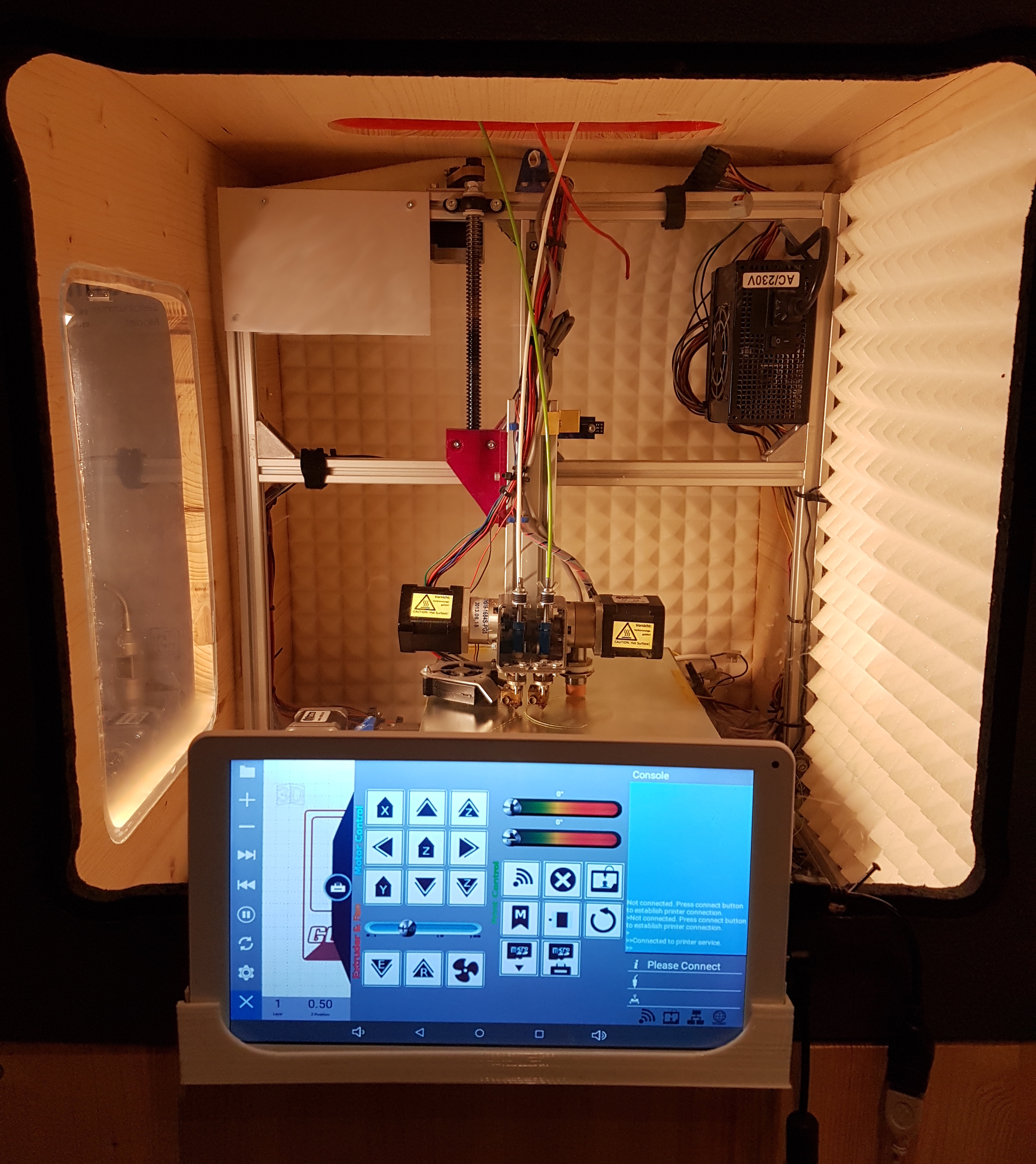
Picture shows my my 3D printer with self-made chassis and attached Yuntab tablet running the GcodePrintr App.
These types of remote displays should work well, as you just communicate to the printer motherboard via WiFi.
Downside, no SD card or thumb drive. Besides you wouldn’t want to risk streaming gcode from a tablet via WiFi, too much EMI that can cause gcode lines getting lost
Same EMI issues. Shielding on those USB cables is good enough for moderate external interference, but high energies are able to pass through, such as those of stepper drivers and motors
@Tim_Visible I can’t comment on the quality of those tablets.
I can however report my findings and experiences with regards to using a USB cable for gcode streaming
Industrial CNC machines use CAN bus as it is extremely reliable than straight serial, and USB.
While you might plug in a USB cable, there is probably a CAN bus bridge right next to it.
CRC is widely used as well, though that isn’t foolproof either
@Gary_Tolley_Grogyan this is connected using USB (USB-OTG Adapter required). It works very reliable. I had USB issues with other cheap tablets I tested with but not with this one. While GCodePrintr supports wireless printing (Bluetooth) I do not recommend that for productive use.
@Tim_Visible Amazons Fire Tablets work well too. I tested the 7" Fire with good results. However, due to the lack of a dedicated power port you can’t charge the batterie while printing because the USB port is used for the printer connection.

 Thank you. I will buy it.