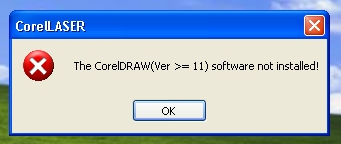
Has anyone else seen this error? I got both Laser DRW and CorelDRAW with my laser (along with the orange dongle). Installed both and all seemed fine as far as the install process. However when I run CorelDRAW this is the error it comes back with. I asked the seller and you can guess the answer too I had to turn off virus protection as it did not like either (Laser DRW / CorelDRAW). Now LaserDRW does work, but CorelDRAW no. I have also tried it on different computers (laptop / Desktop) as well as both Windows 7 & XP. I also downloaded a version from the sellers web site and still the same…
Sean makes sense, however does CorelDraw come with it or do you buy it extra (its expensive I know). I also Googled the error with no luck, however again think your correct that it is looking to launch CorelDraw and its not there… Hmmm another reason to give it a new brain
Install CorelDraw (12 came with your machine most likely but X5, X6 etc work ok). Close CorelDraw and make sure it’s not running.
Install Corel Laser it will know CorelDraw is on your computer and install the plugin.
Install LaserDrw
Open LaserDrw and make sure the correct machine model is selected in the configuration.
Close LaserDrw, open Corel Laser (it will start CorelDraw with the plugin icons available on top right) Check the configuration icon (up by the cut and engrave icons) again from CorelDraw to set the correct machine model again.
Do your designs, importing and cutting/engraving by starting Corel Laser, it willload Corel Draw. Not by starting/using the CorelDraw icon. It will not load the plugin.
Also you may get errors or failure to load the program if you try to open LaserDrw and Corel Laser at the same time.
Just got my K40 yesterday and am having the same issues. Downloaded the Dropbox files and when I click on “CorelDRAW Graphics Suite 12” I get an error message saying “1. Failed to install ISKernel Files. Make sure you have appropriate priveledges on this machine”. Have tried this on 3 different laptops, Vista, Win 7, and Win 10. Help
Finally got the CoreDraw to download to my laptop! What a pain. Used the Dropbox files further up in this thread. Downloaded then UnZip’d, clicked on Setup and away it went!
@Sean_Cherven i don’t suppose you could repost this link to dropbox? cause when i click on this one it says link not found and im desperately trying to fix my corellaser software glitch.