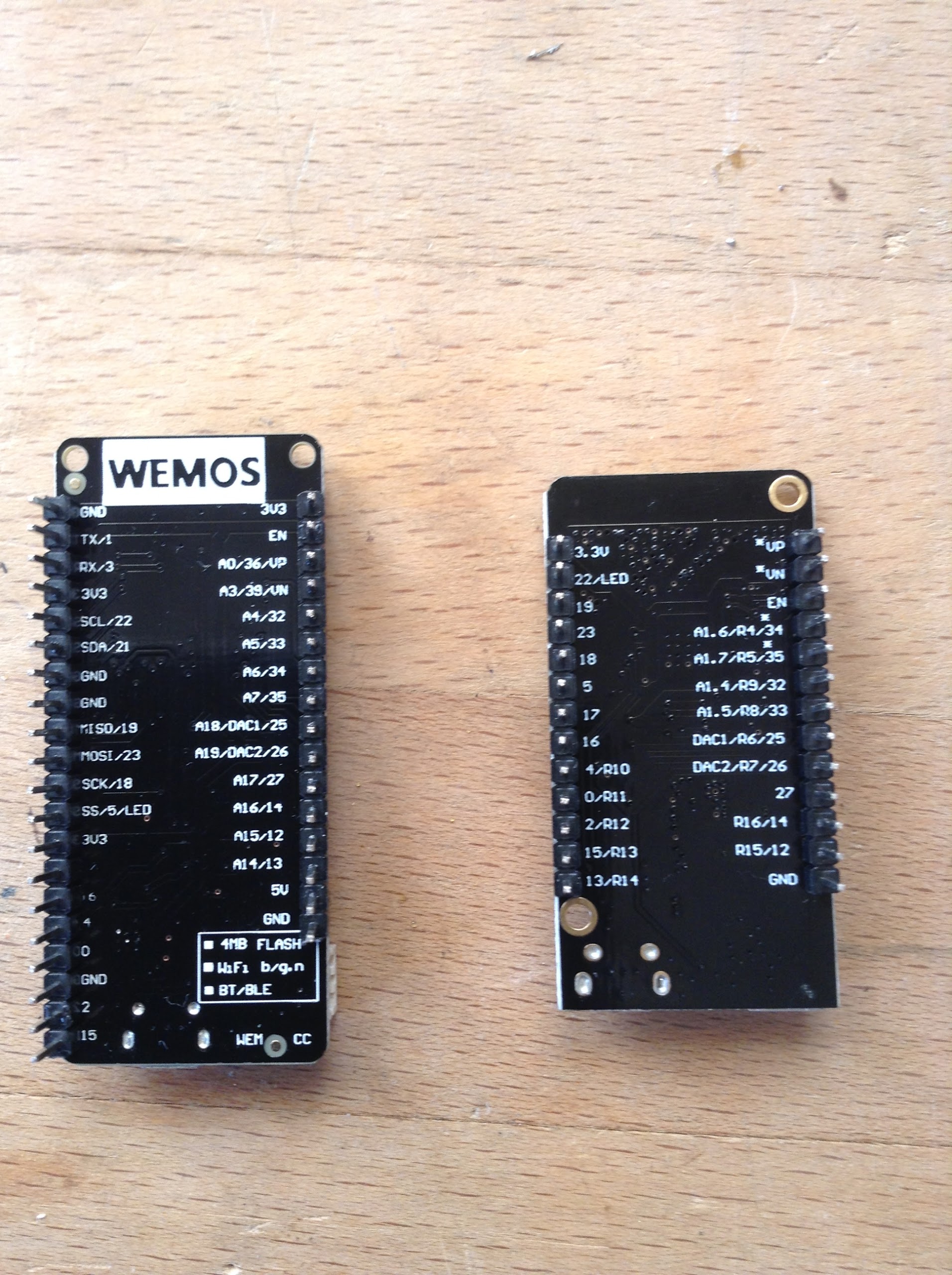
Hello, bad start here with simple fastled code on ESP32. I guess the problem comes from the board (see attached) but I don’t know what to do exactly. Despite many many tries leds are unexpectedly flashing for the left board (lolin32). And for the right board (lolin32 lite) I get a "A fatal error occured: time out waiting for packet header. Both code and ledstrip run good with a nodeMCU esp8266. Is there any issue with these 2 boards? Any help would be appreciated.

Are you using Sam’s ESP32 lib? It’s not merged with the main branch. The new lib uses the rmt channels of the esp32 and should work on all boards. The bit bang stuff did not work on my Sparkfun ESP32 thing.
okay, thx  Unfortunately no success with 3.1.8 nor 3.1.6 nor @Yves_BAZIN 16 parallel output strips fork (which I want to use !). I have to look deeper. Possibly a corrupted board or something … these do not seem to be real Wemos: https://wiki.wemos.cc/products:lolin32:lolin32
Sams’s comes in as 3.1.5. It’s the only one I got working. It is parallel as is because it used the hardware rmt on the esp32.
@Derrick_Giscloux have you check the gnd. If you want to use my version do not forget the #define fastled_nointerrupt 1. I am personne using the dev kit ones. May I see your code ?
@Yves_BAZIN of course here it is, but where do I know for the nointerrupt 1 ?
//Okay avec Arduino UNO
//okay avec WEMOS D1 minipro
//okay avec NodeMCU
//WS2812 Ok
//SK6822 Ok
#include “FastLED.h”
#define NUM_LEDS 60
#define DATA_PIN 0
// Define the array of leds
CRGB leds[NUM_LEDS];
void setup() {
FastLED.addLeds<WS2812B, DATA_PIN, RGB>(leds, NUM_LEDS);
}
void loop() {
// First slide the led in one direction
for(int i = 0; i < NUM_LEDS; i++) {
// Set the i’th led to blue
leds[i] = CRGB::Blue;
// Show the leds
FastLED.show();
// now that we’ve shown the leds, reset the i’th led to black
leds[i] = CRGB::Black;
// Wait a little bit before we loop around and do it again
delay(100);
}
// // Now go in the other direction.
for(int i = NUM_LEDS-1; i >= 0; i–) {
// Set the i’th led to blue
leds[i] = CRGB::Blue;
// Show the leds
FastLED.show();
// now that we’ve shown the leds, reset the i’th led to black
leds[i] = CRGB::Black;
// Wait a little bit before we loop around and do it again
delay(100);
}
}
This code should do this of course: - YouTube
But I get this: https://youtu.be/MD2zt_g3r5E
@Steve_Anken Thanks Steve. Here is there link:
add on top of your code
#define FASTLED_ALLOW_INTERRUPTS 0
Before include FastLED
otherwise use @Sam_Guyer version up to 8 pin in parallel output
@Steve_Anken hey, what RMT has to do w/parallel output, as I understand the RMT (Remote Control) module driver can be used to send and receive infrared remote control signals ?
@Derrick_Giscloux The RMT can send 8 signals simultaneously, with only minimal involvement from the main CPU. It just periodically interrupts the CPU to get more data.
@Yves_BAZIN Have you tried running your 16-way parallel output using core 0? It would probably help with the interrupt problems.
@Sam_Guyer yes i did and it work great  a little bit a little bit of issue when WiFi is on. I am building a 48*120 I will use the 16 parallel output (5 are plugged now) => 360 leds per pin. => FPS>80
That’s great! The #define FASTLED_ALLOW_INTERRUPTS 0 makes it ! thanks @Yves_BAZIN :)) I’ll try next to connect more strips in parallel setup
@Derrick_Giscloux welcome !!! Good luck with the rest. Please show is the result
@Yves_BAZIN Cool. Maybe we should try to combine the code, and give people the choice of which to use
@Sam_Guyer i was wondering if we could use rmt to pilot fast shift registers I have tried with spi but I can’t seem to go faster than 5Mhz
@Yves_BAZIN Where is the code for your 16-way driver? Do you mind if I try to fold it in to the code I have? I’d set it up so you can use compiler directives to choose.
@Sam_Guyer I finalizing some modifications and push a new version probably this week end (i had i piece of code at the wrong place that made the FPS drops hopefully fixed. i will try to track other mistakes like this