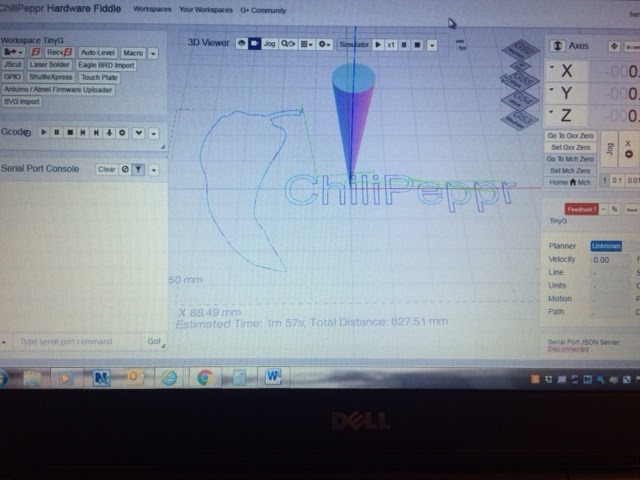
Hi new to Chillipeppr and i already have my workspace locked up. i dragged a file into my work space and everything locked up i have a stack up in the upper right hand corner that I can not remove, question how do i delete a job that i do not want to run and clear everything up.
It doesn’t look like from the screenshot you loaded anything as the 3D viewer would show something or if there was an error it may show garbage or emptiness, but it still shows the CP logo? You can also clear localStorage in your browser console if you want to wipe cached files. Do Ctrl+Shift+J to open console. Go to Resources tab. Click localStorage and wipe all the settings.
Just located this very old thread regarding browser connection issues. After running back through all my steps thought I would try all my browsers this time added Chrome, of course the last an untried version worked. Now, regarding why the other browsers don’t work. I have turned of script blocking, ad blocking, etc. for FF and still no luck. FF is my preferred browser but I will use Chrome if necessary. Any thoughts or answers about the use of other browsers or why it is not working in FF or ME/IE?
@jlauer
Does that mean there is a list of supported browsers and versions available? Or is it just trial and error left up to the individual? I don’t recall seeing anything.
I use Chrome browser, but used also Firefox in the past. Make sure your graphics card driver is correct. I faced a problem once that after installing clean Win7 on a PC with Intel integrated graphics adapter and default graphics driver there was a black screen in CP (and Chrome browser). Updating driver with Intel latest version solved this issue. You may also try to clean Chrome cache.
I did not say to use only Chrome, John, as I used Firefox with no issues some time ago
It is worth to check graphics adapter drivers and possibly clean browser cache, Chrome in my case, but any other browser will do. I remember posts suggesting WebGL rendering related issues - aren’t those related to graphics?
I think this is still better to use Chrome and keep going than not to use CP at all, if other browsers fail.