Hi, Second extruder in my prusa turns on automatically with out any command when

Hi,

Second extruder in my prusa turns on automatically with out any command when power supply is turned on.

I’m using printrboard Rev D with Dual extruder board and FW is marlin… If no USB connection is established( USB is not connected to USB port ) and power supply is ON , second extruder turns on automatically and temperature increases without any limit. It already melted two of my j head hotend assembly. First extruder doesn’t have any issue. But if the USB is connected to port (doesn’t require connection with host, i.e., Repetier) and supply is turned on, then there’s no temperature rise.

Supply USB connection Extruder 1 Extrude 2

OFF OFF OFF OFF
ON OFF OFF ON
OFF ON OFF OFF
ON ON OFF OFF

Shouldn’t second extruder be OFF in all condition unless it’s turned by either command or manual control in Repetier

I made a video of what’s happening


In the video, power supply is already on(not shown in video) As you can see when only the power is turned ON and no usb connection established(usb cable is not connected to usb port), second extruder starts heating up, when connection is made(you can hear the sound as I plug in USB cable) you can see the current extruder temp( extruder 1 is at room temp but extruder 2 is not ). But as soon as the connection is made temp increase gradually reduces and finally stop then return to the room temperature(not shown in video because of size limitation). But if I remove the usb cable again, temperature starts increasing.

I changed the dual extruder board with new one also changed the ribbon cable connecting Printrboard and Dual extruder board , re-flashed FW, even swapped hotends , but no matter what hotend connected to the dual extruder board heats up when supply mains is turned ON if USB is not connected.

I don’t have a spare Printrboard to check…

Could this be due to any issue with Printrboard?

Anyone else had issue like this?

AS far I remember this won’t happened before. Both extruders were off when the power is ON and USB is not connected(But I’m confused, I can’t remember)

But it shouldn’t turn ON. It takes less than 10 seconds to increase temp from 30 degree to 100 degree

Thanks
You must connect a ground between the two boards. Have you done this? It can cause runaway without it. Just connect a black wire between two mounting screws that have an exposed pad. Preferably, nearest to power. Watch that you don’t short any other pads.

Correct dual extruder firmware

Also, make sure the MOSFET’s tab is not touching anything… If it hits a ground it will turn it in as well.

@Brook_Drumm this issue never happened to me before and I haven’t changed the firmware, so I don’t think it’s an issue of firmware.

Currently I’m powering two boards from separate power supply. But if that was the issue it should’ve happened before.Also connection between printrboard and dual extruder board is made using a flat ribbon type cable , so I guess there will be a connection for common ground,But I will connect the GNDs of two power suplliees, would that be enough?

What I don’t understand is second extruder doesn’t heats up if USB is connected to PC USB port or Raspberry Pi, it doesn’t require connection with the host software. But as soon as I remove the USB cable second extruder starts heating up without any limit until USB connection is made. You can see it in the vodeo that as soon as I remove connection temp starts increasing.
If I’m not mistaken USB is connecting to send serial data as well as powering the micro-controller. SO USB is not connected means t mcrocontroller is not powered, and secod extruder turns ON.Does that mean my printrboard having problems. It doesn’t take less than 10 seconds to reach 100 degree celcius from room temp. IF this was happened to me before I would’ve noticed since usb port at the printrboard side is quite loose, it often disconnects if i touch it accidently.

@William_Steele It’s not touching anything. I have a spare dual extruder board and I checked it and extruder is heating up with new board too, also changed cable and power supply.

Could it be casued by faulty printrboard?

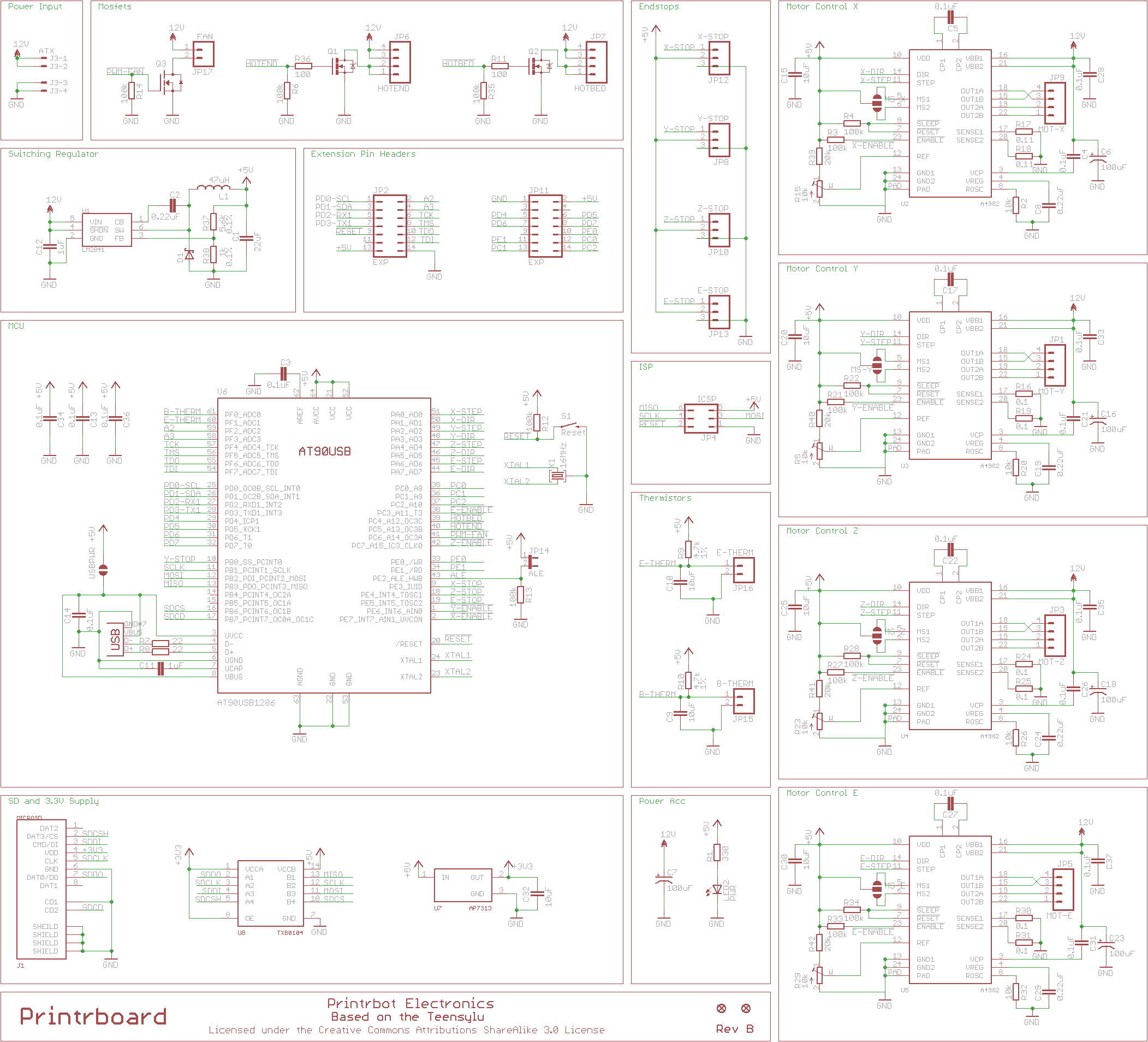
@Brook_Drumm http://reprap.org/mediawiki/images/d/d5/Printrboard_RevB_Schematic150.png

See extension pin headers section , ther’s a common ground

@Brook_Drumm connected GND of two PSU but it didn’t solve the issue

I checked the 5V and GND from EXP and got around 4.3V without USB so I think Voltage regulator is okay

Also checked the pins which are controlling MOSFETs in Dual extruder board.
Found out the ribbon cable pins going to the EXP1 which controls the MOSFET(pin umber 10 and 12 of EXP1 at the Dual extruder board side) , connected jumper wires to the respective pin positions in ribbon cable and checked with voltmeter
without USB=4.3V ( Turns the hot end ON )
with USB = 0V
so micro-controller pin which controls the hotends are sending HIGH signal without USB

SO it’s not the issue with Dual extruder board, something is messing up with Printrboard

From what I understand Micro-controller AT90USB1286 pins 54 and 55 (TDI and TDO) controls Dual extruder Board MOSFETS

Anyone have any other idea??

4.3v is not ok. It should be 5V+/- 2%. The MCU is probably stuck in reset since the voltage is so low. If you disconnect the Extrudrboard, does the 5V go in spec on the Printrboard?

Regarding the ground, while, yes, there is a ground on the ribbon cable, it’s not low impedance enough to make the boards even under load or if you you have separate power supplies for both boards. You need a wire going from one of the mounting holes to the other board’s mounting hole.

Thx Laine!!

@Laine_Walker-Avina

“If you disconnect the Extrudrboard, does the 5V go in spec on the Printrboard?”

Did you mean if I disconnect Dual extruder board, does the voltage will change from 4.3V to 5V +/- 2%?

NO it won’t.
But I noticed another thing
Without USB I only get 4.2-4.3V but when I connect USB it rises to >4.9V (with or without dual extruder board.)
So it could be a regulator issue?

Currently I disconnected dual extruder board since my usb terminal at the printrboard side is quite loose and it will disconnect if anyone touches the cable and I don’t want to melt another hotend.