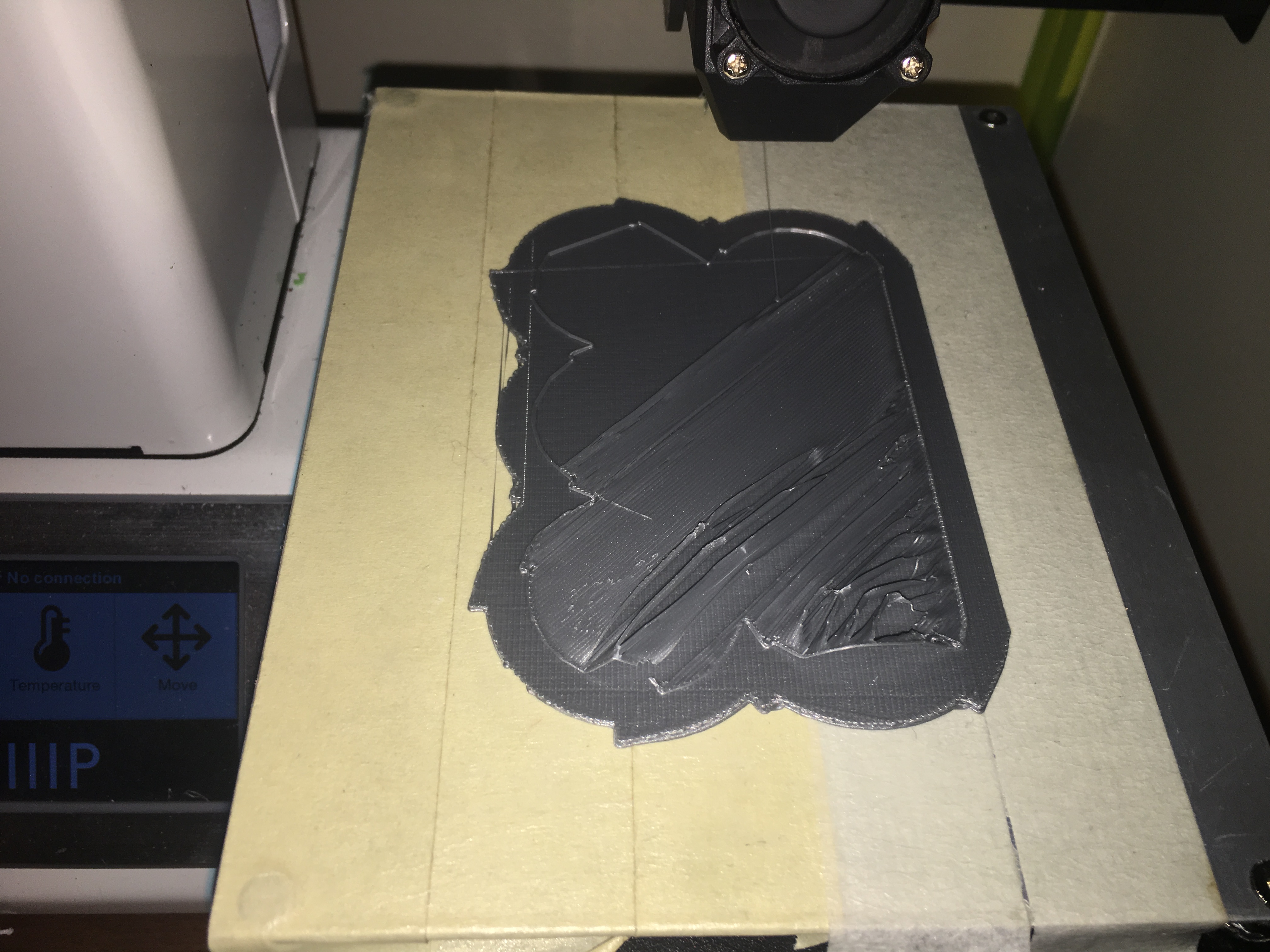
I changed filament (Same Hatchbox PLA, Just silver instead of black) and the filament is lifting off of the raft.
Any thoughts?
Here are my Cura Specs
That’s a tough one . . . well, silver . . . if I recall, temps for metallic colors needs to run a little hotter than usual filaments. I’d bump your extruder temp up to 210 or 215 C.
Possibly two things going on here.
First, looking at the settings, you have your first layer at 0.3mm thick and your nozzle is a 0.3mm nozzle. Typically a nozzle can’t print a layer thicker than 75% of its diameter. The raft will over extrude by default so it will stick to the bed but then it looks like your first true part layer is going down with no squish so it peels off from the raft. In the picture the perimeter looks like a rounded bead. I’d set the first layer to 2mm in this case. Also, the part cooling fan should be off for the first layer for best results if it is not already.
If these are the same settings you used on the black and it was working then that is likely related to the differences in the thermal expansion/contraction properties of the filaments. Different colors will require different temperatures and different thermal compensation settings. This may be the second thing you are running into.
If you do a continuous extrude (load filament) at temperature about 35mm above the bed how does the filament behave? If it pig tails and curls up under the nozzle then it is too cold. If it drops down and then falls over when you stop the load process then it is too hot. You want it to drop down and form a rope like coil and when you stop the loading process the vertical strand remains standing. This will get you to within +/-5C of the optimal melt temperature for that particular filament. As was already mentioned you might be too cold.
Next you need to compensate of the thermal expansion or contraction of the filament. There are various ways of doing this with settings in different slicers by adjusting the extruded width of the filament (0.4 nozzle will extrude a strand between 0.46 and 0.5mm thick) or the extrusion multiplier, etc. I use these calibration clips linked below and modify the diameter of the filament. Note that in the picture the compensated diameter (different than the physically measured used as the starting point) and temperatures written on the clips are different and yet they produce interchangeable precision parts. Nothing was changed mechanically on the printer. This is thermal plastic chemistry and not related to the steps and mechanical calibration of the printer which is straight mathematics.
This will allow you to use your black and silver interchangeably.
Also, if you can get your parts to stick to the bed without a raft (not sure how flat your bed is) you will get cleaner parts. Swap out your masking tape for Blue 3M painters tape and it will stick better.
or
@Jeff_Parish Thank you so much … did all of the suggestions and helped
@Jeff_Parish With a raft … printing fine. Without a raft, still ends up as garbled junk.
Stick with the raft then. Bed is likely not flat enough to eliminate using it. At least you can get it to work like you had it with the black filament.
Back in business! 
@Jeff_Parish I will re-calibrate bed this weekend then