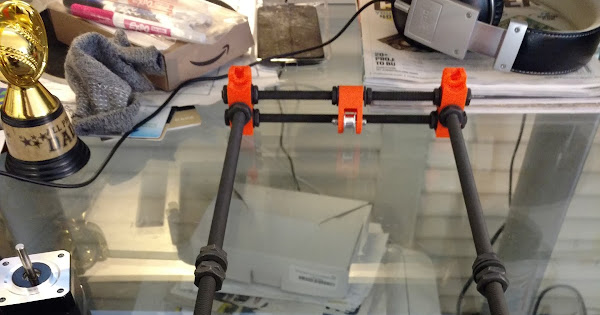
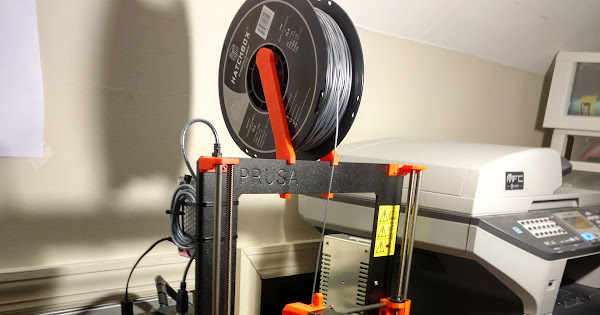
I have taken apart and put back together the printer and this really made sure dimensions are accurate as the manual describes. Now, in the beginning I noticed this too and made adjustments/workarounds to overcome it but after my XYZ calibration fail I decided to make it again as per manual.
I have about 100mm (± <0.1mm) for the ZPlate to the back-feet and I made sure the Y-ThreadedRods are bottomed in the notches of the ZPlate.
The SmoothRods are firmly pressed in their designated places in the 4 feet, also all 4 feet are level, pressing opposite feet doesn’t raise the other from ground, etc.
Now the issue is the one you see in the pictures and in the attached sketch. The bed seems slanted and I am not sure that is possible having the Y-Carriage well built, fact confirmed by the measurement of the distance between the bed and the ground. The only conclusion I can make is that the ZPlate is rotated (check sketch) and to overcome this (without going into software) is to rotate it the other direction. I am only baffled because I did bottomed the YRods in those notches there is no way I could have caused one rod to leave a gap so that the ZPlate can end up rotated …
What is your opinion? Where can this 1.52mm gap on the right side of the bed come from?
Talk about being dialed in!
Yeah, numbers look good but I am missing something because it’s not right 
1.4mm difference … quite in line with the 1.52 I measured at the gap between ruler and bed on the right side but quite a huge number in terms of what tolerances the build needs to ensure a good service with dimensionally correct prints.

@Florian_Ford print this schematic out and follow it like it was law
@Jordan_Cohen I am afraid 200mm calipers are pretty uncommon, mine is 150mm. Furthermore, the 152mm in that schematic is drawn as measured from Nut to Nut … or is it from one side of the plastic foot to the other plastic foot - yeah that makes more sense?
I used these. I don’t remember the actual calibration points it was about a year ago when I used it, all I know is I was in calibration hell before I found the schematic. This piece of paper with my salvation.
Now I just noticed this situation (in the image below), view from rear, the left undercarriage bolt (in this orientation - it’s right side from frontView) is barely hitting the ZPlate, which could mean two things:
- ZPlate is rotated (how can this be if the YRods are seated in the ZPlate’s notches, fully - as far as I can tell -, and by design they are supposed to be seated like that)
- Undercarriage is slanted (How can this be when the smooth rods are placed atop of the plastic parts in the corners, presumably having the same height)
To me the 1) is more likely (can’t for the life of me understand how is this possible) and I think I’ll have to relase a bit the zPlate locking nuts on the YRod on that side and tap the zPlate down until I get good readings on the caliper right?
I wouldn’t take it apart to that point where I can measure the notches in the ZPlate :-s … not yet that is.
Here is what I gathered so far (in the sketch below):
Because basically I have to make Z, which goes together with X, perpendicular to the bed all I care is getting the ZPlate rotated so that it’s square with the bed. For this I can slightly un-fasten the nuts on the YRod where it touches the ZPLate (yellow star on sketch) and tap it down while taking measures until I get where I need to be…
Oh yeah, don’t take the whole thing apart, but if you turn it on its side, PSU down, you can access everything you need to. I didn’t this when I found that schematic, I even resat the x frame back into those groves.
I have no idea how to plot a 3d heatmap of the numbers so one can see where I am but in Excel it looks like this:
I have loosened a bit the right single-side nut on the YRod and tapped the ZPlate on the upper corner until I had a minimum difference between left and right. The measurements were taken with the upside down caliper using the tail so the numbers actually mean the difference in tail length exiting the caliper body. The difference between them is important anyway so judge by that  .
.
I still see a bow (concave) in the middle, I might have fastened pretty hard the middle bolts because before I had a convex bow.
How do you feel about these numbers?
After doing my best to make the bed perpendicular to the frame I noticed straight to the eye that the Y gantry was skewed and I can’t yet get it why (as long as the back feet to ZPlate is 100mm ± 0.1mm tops).
You can see the square (also black) across the bed and the white line at 155 Mark almost dissapearing under the ruler on the left side while on the right it’s 2-2.5mm away from the ruler… why could that be (there is an almost spot-on 152mm between the interior faces of the plastic footings, as the manual ask)

Question guys: skewed Y can only be caused by ZPlate insertion on the YRods (the infamous 100mm which rarely is 100mm in people’s complaints because this very reason -skewed Y) ??
In my case i have 100.02 and 100.18 and I don’t think this small difference would account for the skew … I might need to mae it more, like 104 and 100 (guessing).
That is enough for a skew for sure. The best advice I can give you is to buy those extra large calipers, turn that sucker on the PSU side, lose every bolt, and work your way around with that diagram retighten everything. Starting with the pinch bolts that clamp the Y frame to the main frame. Make sure the m10 rods are sitting tight in those groves.
Here was my build. Not sure if there is something here that can help you.
Buy a paver too, way better prints