I printed this using bigger layer height (0.4 mm), I usually print with 0.2mm layer height. Can anyone hint me why is this happening? It happened also on the second layer (first one was sticked to the platform correctly). I never experienced this with 0.2mm layer. Thanks.


under-extrusion or temperature too high. or both.
0.4mm layers with 0.4mm nozzle? (If yes: Extrusion width should be at least 1.5 times the layer thickness.)
@Tomas_Vit no, to se nesmi? 
https://cdn-enterprise.discourse.org/sketchup/uploads/default/original/3X/a/4/a4a53d431cb21f22af3c559cea93841fd27a937f.png extrusion is oval. if nozzle is .4 and height is .4 then there is no way to get the oval

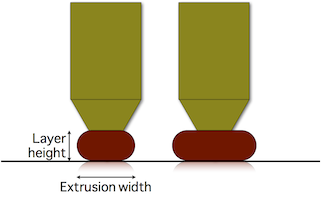
A general rule of thumb is to keep the layer height within 30-70% of the nozzle diameter. That does not mean you can not go outside that range, but if you do you may get less than perfect quality.
Ok, thx guys
Make sure that you keep your filament dry and in a bag with desiccants. I left mine on my printer for an extended period of time and it was doing stuff like that.
You will also need to slow your print speed significantly from what your printer can do at 0.2mm layer height when printing at 0.4mm layers. A lot of people forget that the volume of plastic being called for more than doubles (in the case of 0.2 to 0.4) when jumping up to thicker layers and don’t lower the print speeds. It varies by design but all 3D printer nozzles have a limit to how quickly they can melt and extrude filament and once you hit that you will suffer underextrusion.
if that happens to me i always turn down the extrusion multiplyer