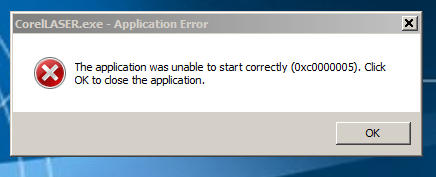
This laser machine come with CorelLaser and LaserDRW but both software give me an error message when I tried to start it. I tried on two computers first one is Win7 Ultimate version the second computer is Win 8 and both computer have same bug.
Yes Corel Draw 12 is working fine but there is no plugin (Laser). Standalone software LaserDRW and Corel Laser from 3DCAD are not working (see error message on the picture) and if the event viewer of windows is accurate, it seem that it’s because of a file named “USBHook.dll” that is part of both 3DCAD software.
I tried to uninstall and reinstall but forget it always the same error message when I try to start the programs. Anyway software are not working on two of my computers.
Also I’m in my control panel right now and I can see that the driver for the USB Dongle (Safe Dog) is recognize as a simple “USB Input Device” no yellow spot on it but , is it the right driver ? maybe not. In the other hand, the driver for the laser machine is recognize as a “Interface USB-EPP/12C…CH341A” and there is no yellow spot on it so I think that this one is ok.
I’m dreaming about a DSP controler and I’m going to order it but it’s goint to take awhile to receive it and in the mean time I want to play with my Laser Machine so I need to find why the software are not working.
I had corrupted file problems while reading from the CD that came with the cutter, so i downloaded the free version of CorelDraw 12 from here, installed and all was good :
Ok, I install the software on a Laptop running Win 7 64 bit and it’s working. This laptop doesn’t have a big settings because there is almost no software installed.
My bug on the other machine is probably because of another software already installed and has nothing to do with the fact that the OS is a 64 bit version.
In fact my other two machine where I have the bug with the laser software have almost the same settings and I will not crash my windows to find why it doesn’t work.
My bug is fixed for now or more “workaround” and I will begin my first Laser Test. after 3 weeks of reading, asking questions and searching, I have it and it’s time to have fun.
I will post my tests / result / questions along the way.
Good you got it working, the first machine i installed it on was an old WinXP laptop and worked very well. I use Sketchup, export to PDF then import the PDF into CorelDraw for cutting.
If you want to export to PDF from Sketchup make sure the projection is parallel and you have all your fancy edges turned off.