I’ve recently called out for a Slic3r calibration instruction to get parts to fit. https://plus.google.com/106582723758544717904/posts/DLPDbuM1QTY
And while I still hope someone can find or put together a good instruction since I like alot of aspects about Slic3r I’m not going to hold my breath. Because I don’t think I have to.
Last night I sat down and tried out #Kisslicer and I am actually laughing here. I’ve just finished my very first Kisslicer print and with pretty much default values straight through except for the printer specifics and the parts interlock perfectly! haha! Very impressed!
The scale of the parts are a tiny bit off but but that’s a minor detail since the error is overall. Should be easy to fix by tuning the settings. They FIT!
Check out this very non-scientific but pretty interesting comparison of the GCode visualization;
I know the feeling when interlocking parts actually fit like they should. I saved my first such successful print as a souvenir (but then, I had to process the mesh to get this to work in slic3r).
So how are you running kisslicer? Is repetier calling it, or do you run it manually and load it into repetier?
@Jim_Peterson I am just jusing Repetier Host for GCode visualization. Among all the GCode viewers I use I think it gives me the best representation of the end result. I run all tools individually. Mostly designing in OpenSCAD. Slicing in Kisslicer/Slic3r. Printing with Octoprint on Raspberry Pi.
@Tim_Rastall I agree! And no I did not notice that yet. Tha’s very cool.
And another impressive thing is that Kisslicer actually runs fine on my old single core Atom netbook, both slicing and 3D view is no problem at all. As reference I can say that Slic3r and Repetier Host is very very slow on it and Cura is totally unusable. The netbook has been standing by the printer as a monitor for Octoprint since it was too weak to do CAD and slicing, but with Kisslicer I could actually use it to reslice objects in the printcave without having to bring my main computer there. Neat!
@Normand_Chamberland that is not too dissimilar to the windows version. You do yourself a disservice by writing it of because its not pretty enough. Personally, I’d much prefer an ugly UI that produces excellent GCode.
@Tim_Rastall I don’t care, I haven’t had any problem with Slic3r so far, and my preference go to the open source kind, not the closed and proprietary kind. Which is why I’m exclusively on Linux in the first place.
I just can’t understand that choice of a prehistoric toolkit when there are plenty of cross-platform modern ones available (Qt, WxWidgets, GTK+…) Really it baffles the mind, what, just to save disk space? LOL. This looks like a 25-year old UNIX station…
@Normand_Chamberland Fair enough. We have different ideals it seems. For me, print quality, speed and features is king, I couldn’t care less about toolkits or UI aesthetics. Incidentally, for an outdated toolkit, the gcode realization is so damn efficient. Once you’ve sliced something, unless you change something that requires changes in positional gcode it just rewrites the code with altered flow rates temps etc etc. Even if you tell it you want 2 copies of something, it just translates the positional codes and inserts travel moves without reslicing.
So, what that means is I can tweek all kinds of stuff during a print and paste in the altered gcode into repetier. While its printing! Just need repetier to provide a frickin find function in its gcode viewer to make this easy.
@John_Ridley
Firstly, make sure you’ve set KISS to show advanced settings.
Have you done any simple calibration objects? I found the flow tweeks that I had for Kiss were different from Slic3r. So, at the risk of telling you how to suck eggs:
Set your extrusion width for perimeters and infill to your nozzle diameter. Make sure you’ve got it doing perimeters first then insides (better accuracy).
Slice a 20mm calibration cube with 100% infill.
Send it to your printer and let it do 25% of the total layers for the completed object.
Pause the print and examine the infill. If the edges of the infill paths are touching, dial down you flow rate on your printer by 20% and re-commence the print job. Let it do a couple more layers then pause again, there should now be a noticeable gap between infill paths, push the flowrate up by 3-5%, rinse repeat until the paths just touch then add a couple of extra % to allow for variations in filament diameter.
Once you’ve done that and confirmed the cube is dimensionally correct. You ‘should’ be laughing.
If you are still having problems gettin parts to fit, there is an inset surface feature that allow you to pull the perimeters inwards a bit (no more than half extrusion width).
@Tim_Rastall You write very good instructions that even I seem to understand Thanks to you I have very nice solid infills now, with the exception of the last point of contact on each object where a small blob of plastic is left which appears to be from the nozzle heat.
Have you written any other posts about calibration in general or KISSlicer calibration in particular?
KISSlicer obviously produces the best results I’ve seen so far with my printer but I find the documentation lacking to say the least. The guides and manuals are marked as “coming soon” and being worked on, and the forum is full of questions about what the specific options do. It’s a hard job to collect all data and get a full grip on the settings.
@korpx Thanks! I’ve written a few technical manuals in my time so I guess I’ve had some practice writing instructions. You are right that there is a lack of good guides for calibration beyond the original ones buried in the reprap wiki. Had I the time I’d love to have a go a writing a more detailed one for Kiss but that’s not likely to happen until I’ve finished the Big Tantillus build. IF you want to keep on tuning things. I can recommend using this calibration piece: http://www.thingiverse.com/thing:8757/#comments
It great for dialing in your retraction and prime settings, as well as cooling settings due to the overhangs. As I mentioned above, as long as you don’t change anything that requires Kiss to re-slice and you are using Repetier host, you can make changes on the fly during a print by pasting the new Kiss Gcode into the the GCode window in Repetier. You can just do a full replace as it doesn’t care about code it’s already processed. What this allow you to do is tweek things like retract and prime during a single print rather than restarting from scratch each time you make a settings change. Of course this only works if the paths and layers are all the same - you can’t change layer height etc without some probably messy results.
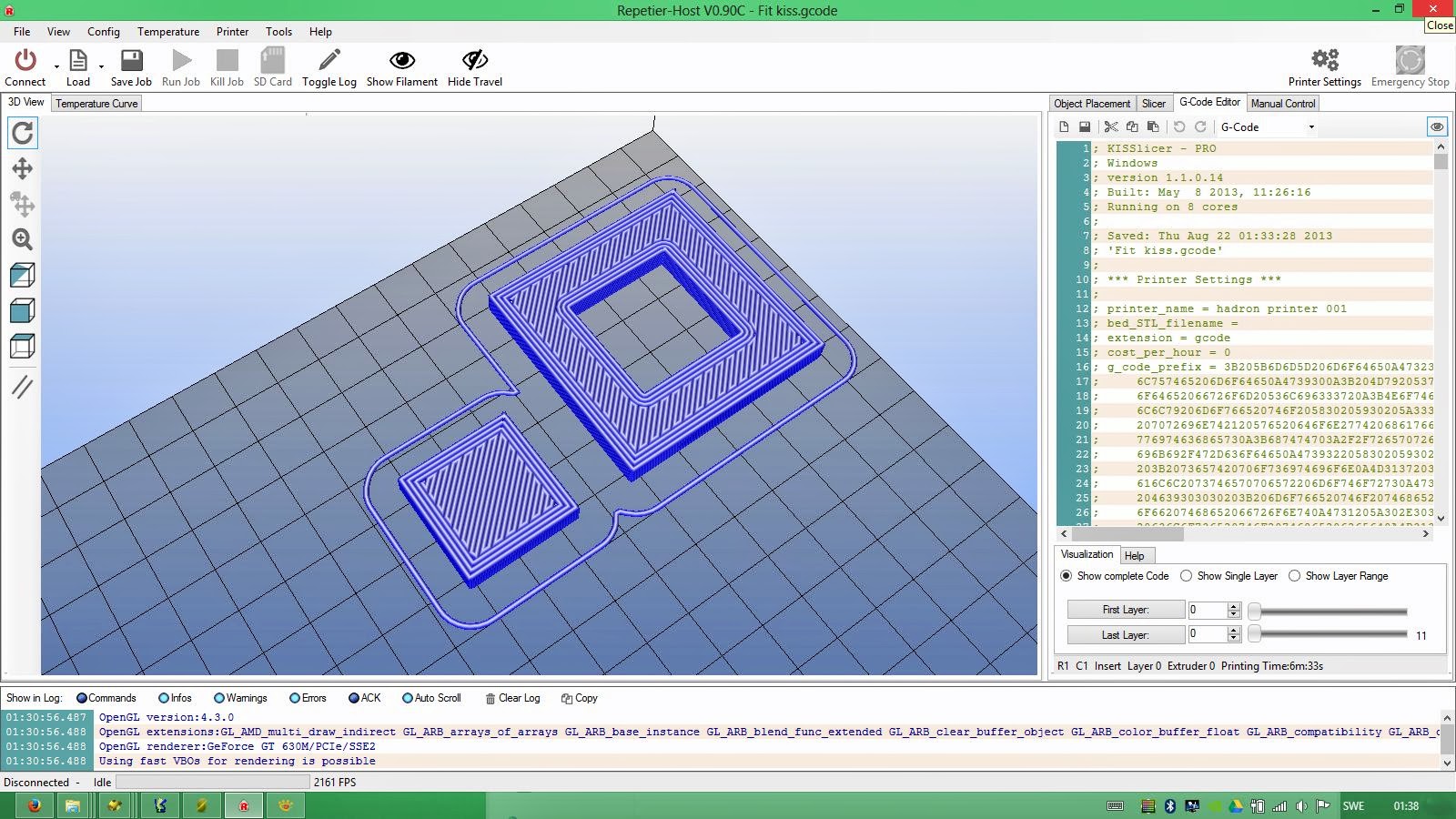

 Thanks to you I have very nice solid infills now, with the exception of the last point of contact on each object where a small blob of plastic is left which appears to be from the nozzle heat.