Ohh bed leveling.
Bed probe says I’m within .12mm of planar across 3 points on my 152x250mm bed.
First level doesn’t go down even; I wouldn’t expect such a layer difference across only 70mm of bed.
Printing with .2mm layer and 150% first level thinkness.
@Printrbot simple metal extended X bed
Any thoughts on what I can do here?

. 04 between the front left and right.
Printer is cheap to produce,and thats why they use auto bed leveling as standard equipment.i dont see that as a problem. Just usebed leveling
@Kristijan_kolak So you are suggesting the probe is bad (giving incorrect readings) ?I’m not sure I can parse what you think I should do here. There is no way to manually level the bed in the middle. Cheap to produce and auto bed leveling do not mean the same thing nor do they go hand in hand.
If the bed isn’t flat, bed leveling will not make it better. Anything can be set level - if it’s not flat the high and low spots will be a problem.
@Alan_Thomason totally understand that. Is that what the bed probe is saying here though, if so then thats something I should go back to PB about. Laying a flat edge on it, it seems mostly flat, can see some slight light in some spots
I really don’t think it’s a problem. It’s within tolerance ant a .3mm first layer should print with no issues. Have you tried a print w .3mm first layer yet? Proof is in the print. Don’t let the math scare you. A crease in blue tape is more than that, isn’t it? Give it’s go with a large model. Don’t give up until the third layer.
Brook
@Brook_Drumm Exactly, the math says it shouldn’t be an issue, though reality is showing that it is. I wish I could attach another picture since I have one with red fialament, but in the second and third picture in my post you can see how the first layer squish changes drastically even over only 70mm. I’m printing with 150% x first layer height (.2mm) so a total of .3mm first layer height.
@Mike_DiMare I think you are misunderstanding what @Alan_Thomason has said.
Three point sampling is based on the assumption that the bed is a perfectly flat geometric plane.
However, in reality no bed is perfectly flat. There is always some amount of various imperfections - like warping, twisting, cupping, bowing, corrugations etc. etc.
The bed on my Printrbot was warped such that the rear-right corner was lower than the perfectly flat plane calculated by 3 point sampling. I couldn’t print anything that used that corner of the bed until I manually forced the bed back to a flatter shape.
Use the G30 command to spot sample the height of your bed in all four corners to look for some degree of variance from a perfectly flat plane, then manually correct any large variation as required.
If the variation is very large (which I would say is also unlikely) then you are owed a warranty replacement. But first you must at least do the G30 sampling to determine the variance across the whole bed before asking for a replacement.
Maybe it’s worth knowing that after I manually corrected the slight warp on my bed, I can reliably print a first layer that is 0.1mm, rather than the 0.3mm first layer that is commonly advised.
@Paul_Gross Thanks, yeah I think I misunderstood what he was saying. Indeed all signs point to a warp issue, but I will still test with G30. Any advise on how manually correct this warp. I’m assuming you milled it?
Correcting a warp depends on many things, including the severity of the problem.
In my case - the 3mm-gauge steel bed of the Printrbot Simple Metal, I placed spring washers under the four mounting screws:
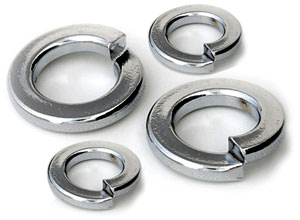
By turning each mounting screw I can now make very fine adjustments at each corner - a full turn is less than 0.1mm in height variation.
By repeatedly calling G30 and adjusting each screw, I can quickly get the height variance at each corner to about 0.01mm.
Sounds like the X axis is not parallel to the bed.
Correcting the warp depends on the bed - if it’s cast then milling is about all you can do. Aluminum plate/sheet is a different story. I’ve heard of several people manually “adjusting” the flatness by bending in the appropriate locations (trial and error). I’m not certain I could do it; but, some have. My Rigidbot build plate looked pretty bad so I didn’t even try - I didn’t install it and went straight to glass.
I mean it seems like the probe is pretty accurate, but I definitely see the change in thickness on the bed. Are the beds for the simple metal reversible?? If they are swap it’s direction and see if it has the same issue but on the opposite side. Then that could tell you the bed is not perfectly flat.
There is also a test I believe that will run the prove over 9 or so points and give you their z levels and show you how level it is.
Change your first layer to .3mm as well.

