Question about improving the animation quality:

Question about improving the animation quality: When working with 2 CRGB buffers (both using the full 3x8 bit color depth) and blending them together (using blend or nscale or whatever) the result tends to flicker in the areas of very dark colors. I think that happens due to rounding errors caused by 8 bit math. Is there any clever filtering method or some other workarround to get rid of this effect? It would be nice to create multi layer animations which look as smooth as single layer ones. Any thoughts?

edit: Here a short video with an animation restricted to 17 fps to make the problem clearly visible: https://www.youtube.com/watch?v=Nl_AqtHi0vs&feature=youtu.be

A partial way around this is to use the nscale8_video function to control your global brightness, as the last step.

for(int i = 0; i < NUM_LEDS; i++) {
CRGB pixel = nblend(buffer[0][i], buffer[1][i], 127);
leds[i] = pixel.nscale8_video(currentBrightness);
}

Global brightness I use to control without touching the CRGB leds. FastLED.setBrightness(BRIGHTNESS);
The problem appears at extreme blending ratios like CRGB pixel = nblend(buffer[0], buffer[1], 2);
I do something similar like the video scaling by defining color palettes which never go to full black. After blending I check again and replace every single value <3 with a 3. It limits the visible flickering in the low range. For the video snippet I commented this part out to make it better visible. Maybe the blending should be done in a 16 bit range (with a 16 bit ratio) for more precision and be mapped back to 8 bit after?!

I took a deeper look into a lot of the pieces of this, and found a part of the problem-

Starting with a CRGBPalette16 object-

CRGBPalette16 newPalette() {
static byte gradientByte[20] = {
0, 3, 3, 3,
64, 13, 13, 255, //blue
128, 3, 3, 3,
192, 255, 130, 3 , //orange
255, 3, 3, 3
};

CRGBPalette16 returnPalette;
returnPalette.loadDynamicGradientPalette(gradientByte);
return returnPalette;
}

I put that onto a simple color wipe, and slowly marched through it- notice the differences between these two outputs-

localCanvas[XY(x,y)] = ColorFromPalette(currentPalette, XY(x,y) + shift, 255, NOBLEND);
localCanvas[XY(x,y)] = ColorFromPalette(currentPalette, XY(x,y) + shift, 255, LINEARBLEND);

You can see the blue flicker in two positions when LINEARBLEND is chosen. I think this is an interference pattern caused by the following-

1- the interpolation from the gradient to the CRGBPalette16 object.
2- the interpolation from the CRGBPalette16 object to a smooth 256-color palette using ColorFromPalette with LINEARBLEND.

As far as solutions go, a few come to mind-

The easy fix is to push the “white” parts of the blue to where they can do less damage-
static byte gradientByte[32] = {
0, 3, 3, 3,
32, 3, 3, 129,
64, 13, 13, 255, //blue
96, 3, 3, 129,
127, 3, 3, 3,
128, 3, 3, 3,
192, 255, 130, 3,// , //orange
255, 3, 3, 3};

A more complete fix would be write a copy of the ColorFromPalette function to use your specific gradient that does the interpolation in one step.

Love your work!

Thanks for your detailed analyzis! Which version of FastLED are you using? I´m here with 3.001.005. I wonder because when I try the LINEARBLEND with my palette everything stays black. Anyway your hint brought me on the right track! The problem is indeed the palette itself. Again because of the 8 bit limitation the lowest end of brightness range has visible steps (color changes) which are different for r, g & b (depending on the color). THAT is the main reason for the (color) flicker and with multilayers and further scaling the effect becomes worse. Not sure if I express myself understandable, at least I understand now :wink: So there is no way arround: we need complete 16 bit palettes, math and temporal dithering output to get rid of that. Anything else just shifts the problem, but doesn´t solve. Even a handtuned and optimized 8 bit palette is still limited to 8 bits. Having a gradient from black to orange starts with red before some entrys later the green comes in. Hiding the problem by avoiding the lowest range works but eats contrast (dynamic range). Well, still better than flicker at lower fps rates. Now I have my peace with it. Thank you very much for your support, @Jeff_Hannan ! I´ll try to write all 256 palette entries myself - let´s see if there is maybe an improvement possible.
The 8-bit palettes are certainly a contributing factor.

Another factor is just the math. An 8-bit color merged with an 8-bit color results in a messy 8-bit color. A 16-bit color merged with a 16-bit color results in a messy 16-bit color… but the 8-bit down-sample is clean.

Another “simple” solution would be to double the size of your working canvas, an then down-sample to the LED array.

I think now I see the bottom of the rabbit hole.
A) Every 8 bit palette suffers from the limited resolution in the lowest brightness range.
B) Any kind of gamma adjustment expands this critical area even further.
C) Exzessive data processing in the 8 bit space makes everything even more messy.
Solution to C: Everything should be internally rendered with 16 ore 32 bit precision and just in the very last step mapped down to 8 bit… or even better: mapped to 16 bit and fed into a fast temporal dithering which drives the 8 bit output.
Solution to A) Having a palette with more than 256 entries for smoother gradients. A perfect linear gradient from black to red and back to black needs at least 512 enties. With more black areas the lookup table (palette) needs to be even bigger.

Doubeling the canvas size means 4x the calculation time + downsampling time. How would you do the downsampling? Averaging over 2x2 areas?
I suspect it´s really time to use a Teensy 3.6 and exploid the FPU.

Found another source of flicker.
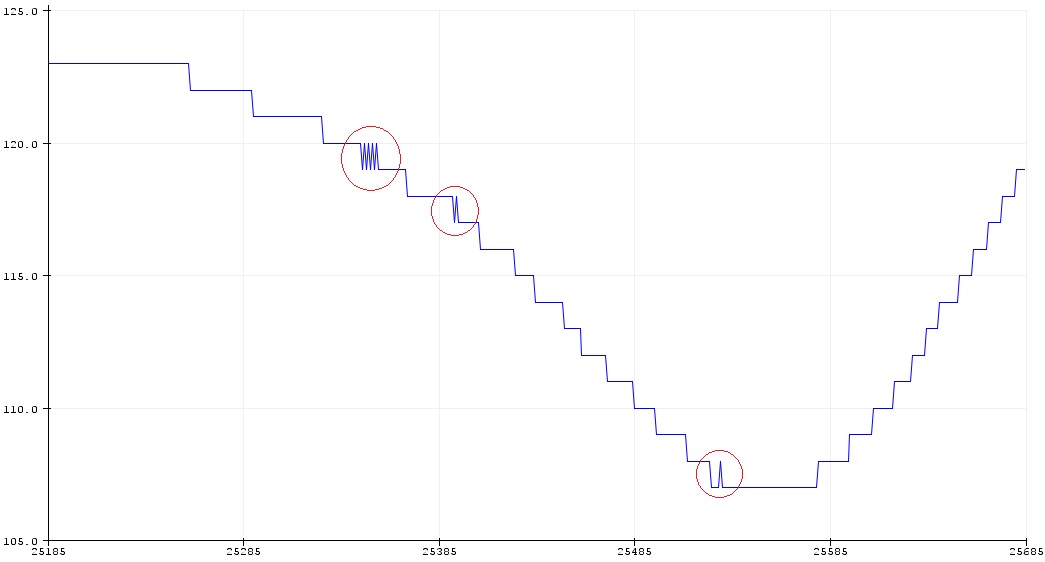
D) Sometimes the control parameters look like this: http://fs5.directupload.net/images/170626/in9fvsqc.jpg
Solution: Ring buffer and averaging.

Welcome to why the rewrite (when I get back to it) to support rgbw will also be adding support for crgb16 and crgbw16 as well - so you can play in 16-bit color spaces and the library will shuffle down to 8/12 bit based on the output hardware (as well as use that info for dithering)

Today I played with large look up tables (color palettes). Minimal version black-red-black needs 512 entries. The more gradients I want to see within the table the longer the table has to be. Then I scaled the inoise16 data down to the palette length. Working fine. As long as the resolution is limited to 8 bit I better use it completely by avoiding any steps >1. Improves the quality by making slow movements look smoother.