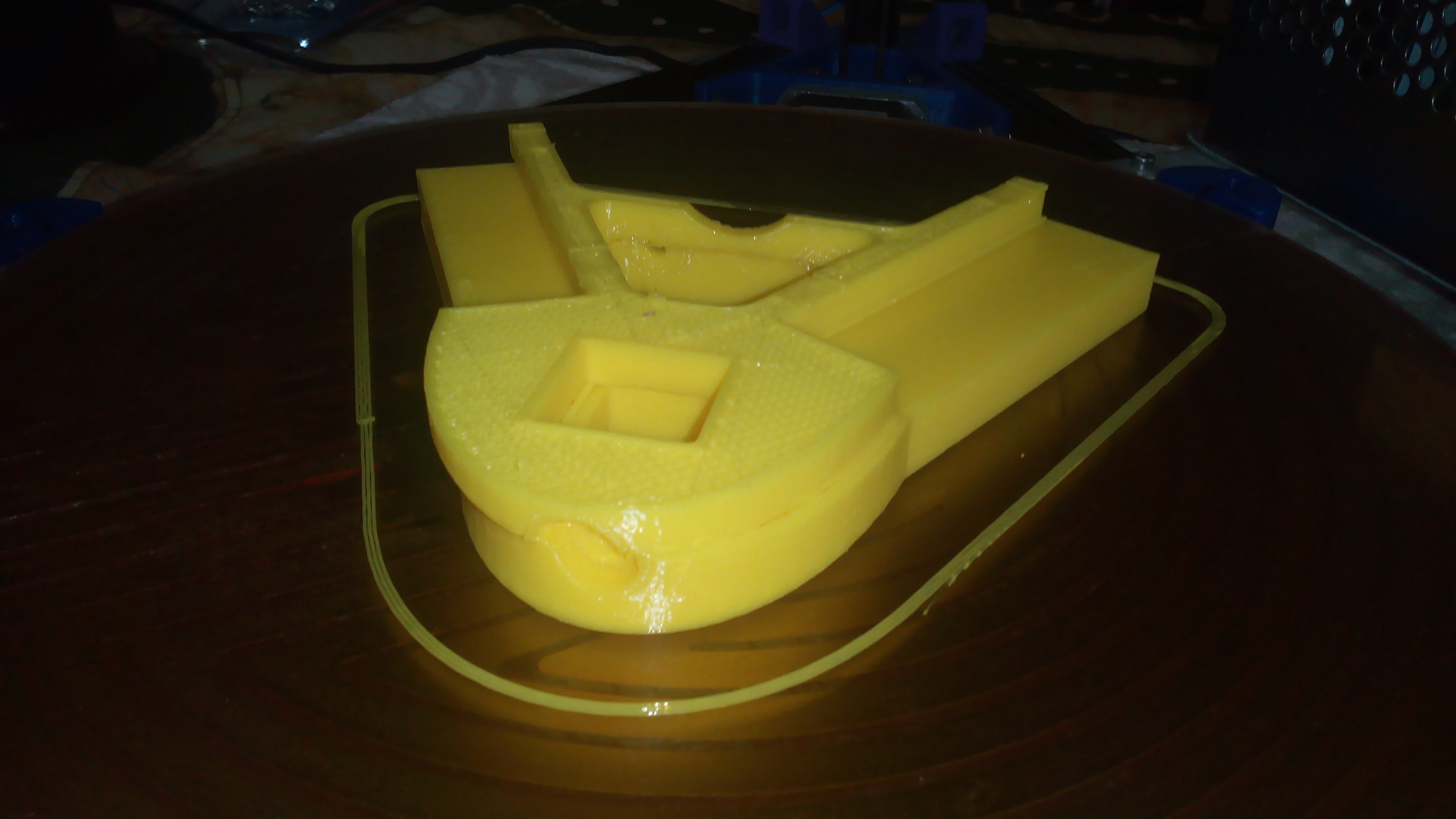
Sliding Layers.
Hi everybody I’m still in trouble due of this frustrating problem, happening sometimes, and I can’t figure out what’d be the cause yet.
kossel, PLA 1.75, slic3r, USB connection, Marlin V1, here the sic3r profile :
print settings :
generated by Slic3r 1.1.7 on Tue Jan 27 16:31:58 2015
avoid_crossing_perimeters = 1
bottom_solid_layers = 3
bridge_acceleration = 3000
bridge_flow_ratio = 1
bridge_speed = 100
brim_width = 0
complete_objects = 0
default_acceleration = 3000
dont_support_bridges = 1
external_perimeter_speed = 60%
external_perimeters_first = 0
extra_perimeters = 1
extruder_clearance_height = 20
extruder_clearance_radius = 20
extrusion_width = 0
fill_angle = 45
fill_density = 25%
fill_pattern = rectilinear
first_layer_acceleration = 1500
first_layer_extrusion_width = 200%
first_layer_height = 100%
first_layer_speed = 50%
gap_fill_speed = 20
gcode_comments = 0
infill_acceleration = 2000
infill_every_layers = 1
infill_extruder = 1
infill_extrusion_width = 0
infill_first = 0
infill_only_where_needed = 0
infill_speed = 120
interface_shells = 0
layer_height = 0.3
min_skirt_length = 0
notes =
only_retract_when_crossing_perimeters = 1
ooze_prevention = 0
output_filename_format = [input_filename_base][print_preset][printer_preset].gcode
overhangs = 1
perimeter_acceleration = 1500
perimeter_extruder = 1
perimeter_extrusion_width = 150%
perimeter_speed = 80
perimeters = 3
post_process =
raft_layers = 0
resolution = 0
seam_position = random
skirt_distance = 10
skirt_height = 1
skirts = 4
small_perimeter_speed = 60%
solid_fill_pattern = rectilinear
solid_infill_below_area = 70
solid_infill_every_layers = 10
solid_infill_extrusion_width = 0
solid_infill_speed = 50%
spiral_vase = 0
standby_temperature_delta = -5
support_material = 0
support_material_angle = 0
support_material_enforce_layers = 0
support_material_extruder = 1
support_material_extrusion_width = 0
support_material_interface_extruder = 1
support_material_interface_layers = 3
support_material_interface_spacing = 0
support_material_interface_speed = 100%
support_material_pattern = pillars
support_material_spacing = 2.5
support_material_speed = 80
support_material_threshold = 0
thin_walls = 1
threads = 2
top_infill_extrusion_width = 200%
top_solid_infill_speed = 50%
top_solid_layers = 3
travel_speed = 120
printer settings :
generated by Slic3r 1.1.7 on Tue Jan 27 16:49:59 2015
bed_size = 240,240
end_gcode = M104 S0 ; turn off temperature\nG28 X0 ; home X axis\nM84 ; disable motors\n
extruder_offset = 0x0
gcode_flavor = reprap
layer_gcode =
nozzle_diameter = 0.4
print_center = 0,0
retract_before_travel = 2
retract_layer_change = 1
retract_length = 4
retract_length_toolchange = 10
retract_lift = 0
retract_restart_extra = 0
retract_restart_extra_toolchange = 0
retract_speed = 20
start_gcode = G28 ; home all axes\nG1 Z5 F5000 ; lift nozzle\n
toolchange_gcode =
use_firmware_retraction = 0
use_relative_e_distances = 0
vibration_limit = 0
wipe = 0
z_offset = 0
help me if you can…
tive este problema. corrigi ajustando a tensão do motor do eixo Y.
all three motors have same reference voltage, set to provide 1.8 A (motors Wantai, up to 2.5 A); I don’t think about a voltage regulation problem…
Usually when I see this, it is caused by over-extrusion. The over extrusion causes the layer to be slightly taller than it should be, so when the next layer prints, the nozzle hits on the previous layer. Normally it can handle a bump on a thin wall, but when it does a flat surface, it has more resistance and causes the stepper to skip a step, which causes the offset you are seeing.
Sometimes, printing too hot can have the same effect by causing additional swell of the extruded filament.
Verify the stepper current (as @Diego_Rodrigues suggested), filament diameter settings, belt tension and pulley set-screws. If all of these are fine, then try printing again with a lower temperature, and see if that helps.
ohhh, many thanks, it is like a little light in obscurity… I’m extruding eSun PLA at 200°C, as I read so in the filament box (it was recommended a 230°C temperature, but I don’t understand why PLA do need a so high temperature), may be is it a too high temp to extrude?
230 seems too high for PLA, but that can vary a lot depending on the exact mixture they use. I always question how accurate the reported temps are on the hot ends. Many people use the default settings in the firmware, which may or may not match the type of thermistor they are using.
I would try playing with the temperature and see how low you can go before your extruder starts to struggle, then raise it about 10 degrees above that. If that ends up being about 200, then I doubt it is a thermal problem, and would recommend re-measuring the diameter of your filament. Sometimes the diameter can vary a fair amount on the same spool. If the diameter is thicker than your setting, then it will over-extrude.
If you haven’t read it before, I highly recommend reading about Nop Head’s experiences in building a 3d printer from the ground up. LOTS to be learned from this…
I have found that keeping the motor drivers cool helps prevent them from skipping steps.
I agree that this is likely to be the result of the nozzle bumping the print somehow, and causing the motor to skip steps. This is not from any knowledge or experience… but an educated guess… How about increasing retraction? Perhaps it is a “zit” sticking up to cause the nozzle collision. If this is a delta, enable that little Z hop along with retraction?
The leading cause of missed steps is stepper overheating. Which can be caused by a) current set too high b) belt tension too high c) other
Yes! overheated motor also causes loss of step. Well remembered!
230° for PLA is realy too much, if termistor is ok. I recommend testing the @Jason_Barnett suggestion. raising the temperature only until the point at which the filament start down the nozzle and reduce slightly after that. I generally use between 185 and 190 ° C to print in PLA.
Good luck!
Does it always happen in the same general direction or height? It can be caused by friction or even a stepper not having enough torque.
Too low currency for that stepper can also be a cause then.
Experiment and only change one parameter at a time.
Thanks to all, I tried to insert the Z lift after retraction, and the print went well; now I’ll investigate to solve that problem without needing to use Z lift, maybe it’s too much filament while extruding; I have to calibrate all much fine
hehe! 3D Printer is like a carburator of engine. kkk!!