Some pictures from my prusa i3 mk2 build out.
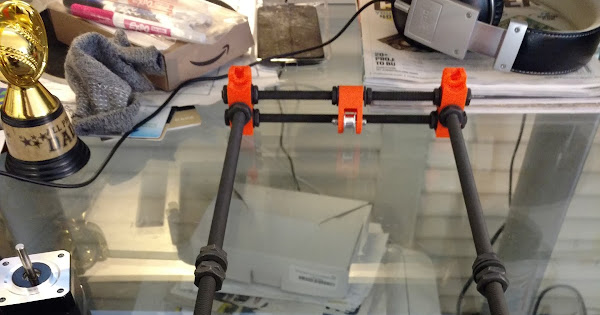
From the photos I can see that x rods are not 100% parallel to the bed, may be (only) 99%.
Did you leave it like that? I’m at that step and wonder if i have to correct that or if it is even possible to align it more precise.
How long did it take you to build?
Mine took about 8 hours and I took one’s time with building. It felt like 3 hours because I enjoyed it so much.
@Christian_Kemme you are correct, they were not parallel. And home failed too, as you can see in the picture. I fussed with the y frame for the same amount of time as the whole build took to get it right. It wasn’t until I found the y cad schematics posted on the prusa forums that I was actually able to fix it.
@Fred_U about 10 hours to build, but I would say I spent a collective 10 hours tuning the frame, all in the y. And a few hours getting my dimensional accuracy right.
I’ve recommended the genuine Prusa kit for the local public library based on the online reputation. Saving money with the kit also means a build project for the library’s makerspace, for public viewing and interest. I’m hopeful it will be approved and that the build will go well.
@Fred_U are you the one building it? You need this diagram, https://github.com/PrusaMK2Users/MK2_Tips_and_Tricks/blob/master/Prusa-i3-mk2-Dimensions.png for the frame. It will save you 10 hours.

Where are you located? I can help if your localish.
@Jordan_Cohen I’m in Florida, but I’m likely to be the advisor and only partially the builder. The purchase is not yet a certainty and with an 8 week backlog from Prusa, it isn’t going to happen quickly. I’ve saved the document you referenced, especially if it’s going to save me ten hours! Thanks.
I thought I can twist the z frame to get it parallel, can I ?
@Christian_Kemme nope, that won’t work. Trust me. My advice is to take that schematic, turns the printer on the PSU side, and starting from the back measure and fix every segment with some large callipers. Your printer will be home, and everything will be real parallel. I passed the XYZ calibration the fist time after this. It was amazing.
My printer passed the XYZ calibration successfully. It was not perfectly perpendicular, but the second best result. It said the firmware will autocorrect this minor flaw. Fortunately I have another working 3D printer with which I printed this very useful helper:
The great paradox of reprap printers right, it takes (a good working) one to make one