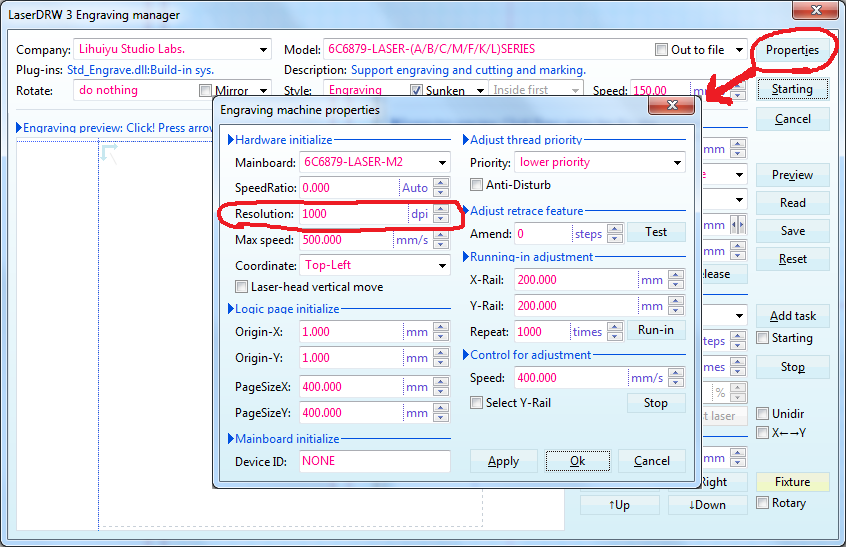
Half way through this afternoons laser cutting, after loading in a new file , it started to squash the image by 3/4 on the x axis. I ran a couple of laserdrw test files and each of these had the same 4:1 proportions.
I have the M2Nano driver board. Is this a board, wiring or stepper issue or have I inadvertently pressed a setting in the software somewhere, which i can undo.
Any thoughts or links would be most helpful. Thanks
I don’t have an answer but I have a couple of things you could try.
From the LaserDRW Engraving window go into the properties and change the resolution to something other than 1000 (like 500). Then run short job (like a single square). After that go back in an change it back to 1000 dpi. I am grasping at straws a little but this will send the resolution signal to the K40 so if the internal settings got screwed up it might reset it. (Turning the K40 off then back on might accomplish the same thing.)
Lower the speed by 1/2 and run a short job just to make sure you get the same results. This is just to make sure motors are not missing steps because of a mechanical problem.
@Scorch The on/off didnt seem to do it so I changed the resolution and then back as you suggested and also unticked and then reticked a few boxes. I noticed that it would jog pas about 75mm in both axis so checked that the bed size was set as before. The long and short of it is that after changing and then in changing back settings and switching on and off it seems to have reset itself and is working normally. Wish I knew definitely to pass on what I did to solve.